
Sherlock Scenario
Sherlock Overview
Forela’s domain controller is under attack. The Domain Administrator account is believed to be compromised, and it is suspected that the threat actor dumped the NTDS.dit database on the DC. We just received an alert of vssadmin being used on the DC, since this is not part of the routine schedule we have good reason to believe that the attacker abused this LOLBIN utility to get the Domain environment’s crown jewel. Perform some analysis on provided artifacts for a quick triage and if possible kick the attacker as early as possible.
Why NTDS.dit is the crown jewel
NTDS.ditis the Active Directory database on a Domain Controller (DC), the server that handles logins for the whole domain. It holds the password hash of every account in the domain. Windows keeps the file locked while the DC is running, so attackers take a Volume Shadow Copy (a point-in-time snapshot of the disk) and copy the database out of the snapshot.vssadminis a legitimate Windows tool for managing those snapshots, which is why the scenario calls it a LOLBIN: a “living off the land” binary that is already on the system, so using it raises fewer alarms than bringing in a hacking tool. They also take theSYSTEMregistry hive, which holds the key needed to decrypt the hashes.
The evidence came as a zip file:
Artifacts/
├───SYSTEM.evtx
├───SECURITY.evtx
├───Microsoft-Windows-NTFS.evtx
└───C/
    └───$MFT
Preparing the evidence
I converted the three event logs to CSV with EvtxECmd:
.\EvtxECmd.exe -f 'path\to\SYSTEM.evtx' --csv "path\to\output\directory" --csvf SYSTEM_output.csv
.\EvtxECmd.exe -f 'path\to\SECURITY.evtx' --csv "path\to\output\directory" --csvf SECURITY_output.csv
.\EvtxECmd.exe -f 'path\to\Microsoft-Windows-NTFS.evtx' --csv "path\to\output\directory" --csvf Windows_NTFS_output.csv
and parsed the $MFT with MFTECmd:
.\MFTECmd.exe -f 'path\to\$MFT' --csv "path\to\output\directory" --csvf MFT_output.csvTask 1: When the shadow copy service started
Attackers can abuse the vssadmin utility to create volume shadow snapshots and then extract sensitive files like NTDS.dit to bypass security mechanisms. Identify the time when the Volume Shadow Copy service entered a running state.
The Service Control Manager logs Event ID 7036 in the System log whenever a service starts or stops. Filtering SYSTEM_output.csv for that ID returned many services, so I added a keyword search for shadow, which left a single event:
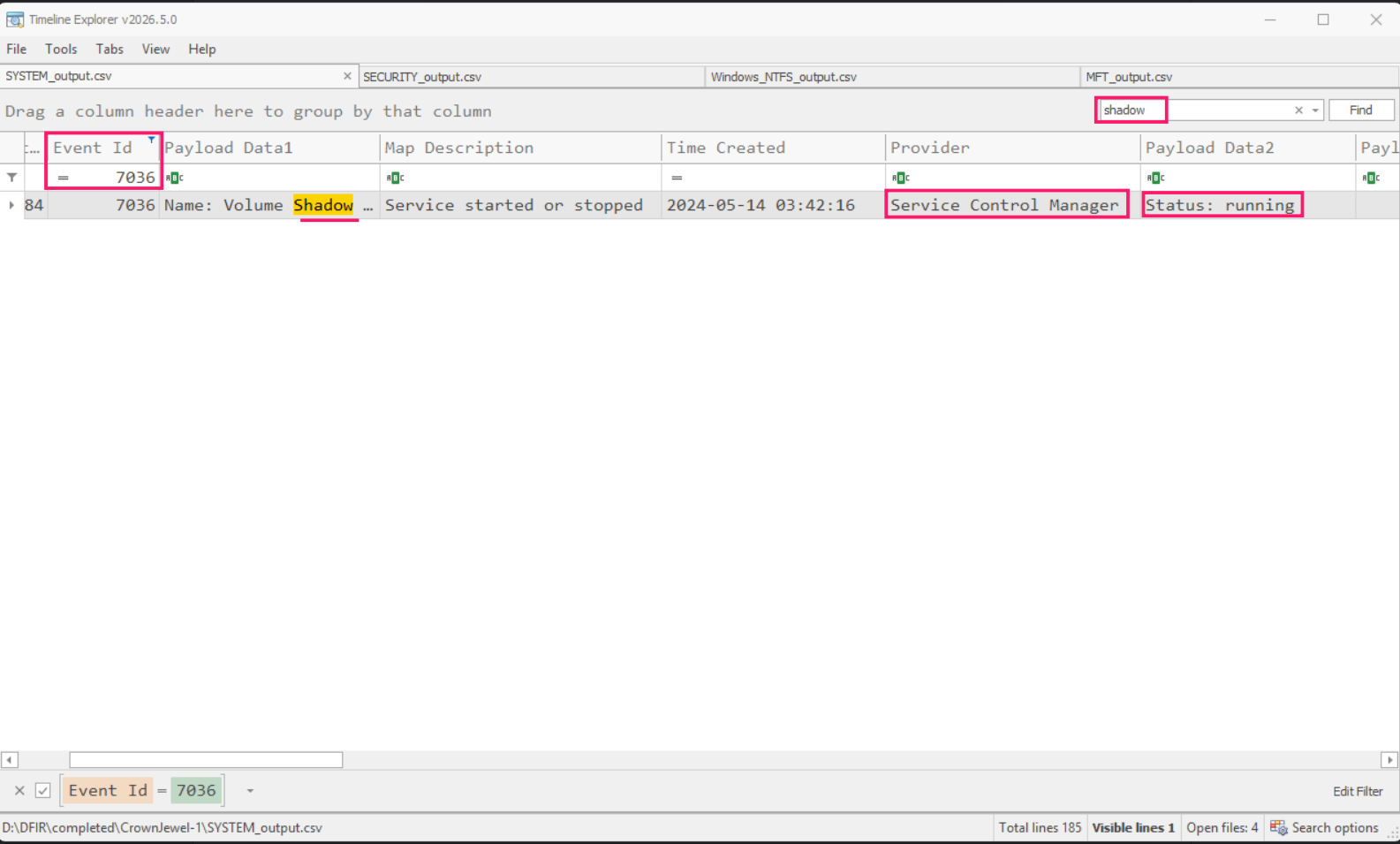
Payload Data2 reads running, so this is the Volume Shadow Copy service starting, and Time Created gives the time.
Answer
2024-05-14 03:42:16
Task 2: The groups and the machine account
When a volume shadow snapshot is created, the Volume shadow copy service validates the privileges using the Machine account and enumerates User groups. Find the two user groups the volume shadow copy process queries and the machine account that did it.
When a process lists the members of a security-enabled local group, Windows logs Event ID 4799 in the Security log. I filtered SECURITY_output.csv for it and searched for vss:
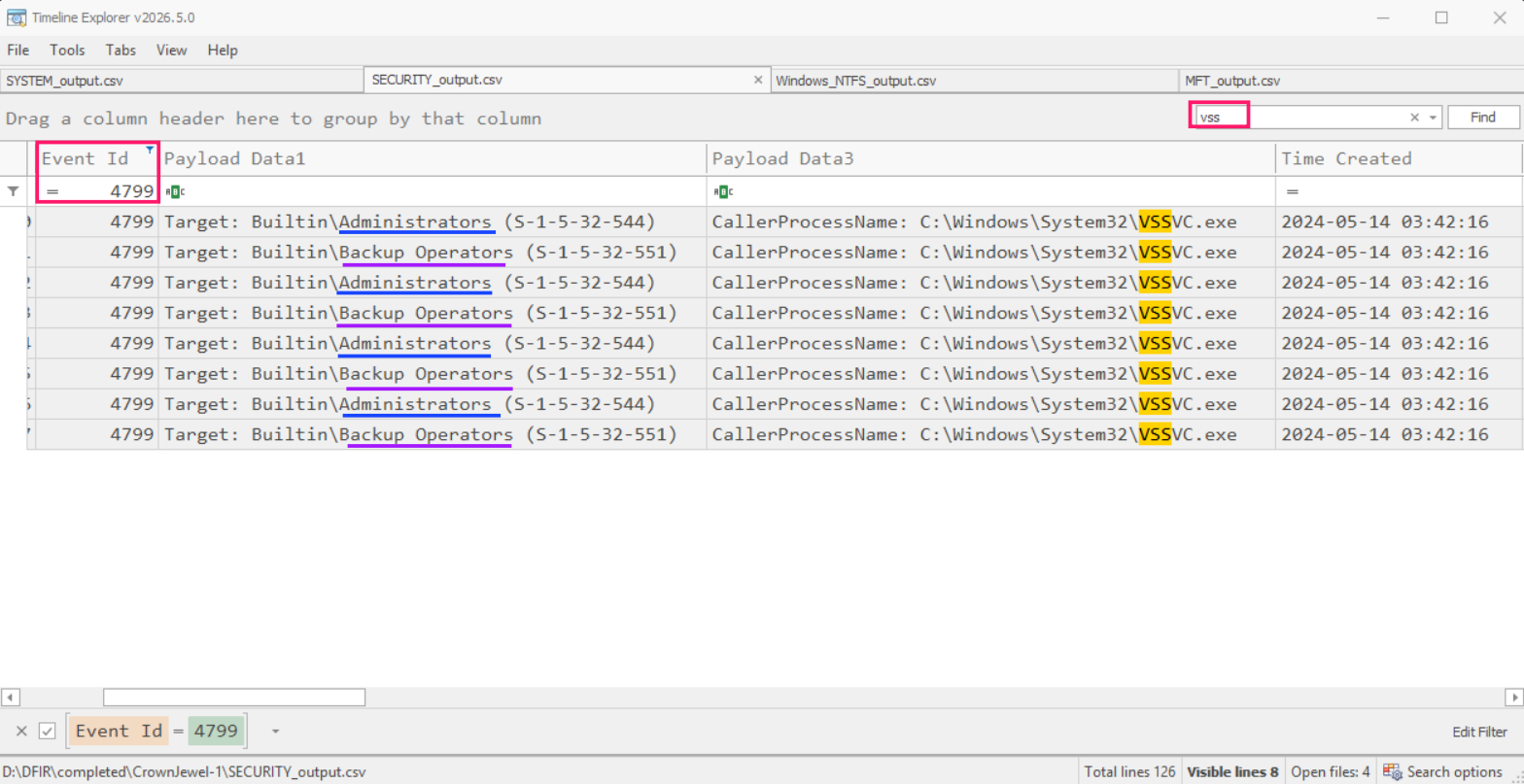
Two groups were enumerated:
Target: Builtin\Administrators (S-1-5-32-544)
Target: Builtin\Backup Operators (S-1-5-32-551)
The account that queried them is in the event’s Payload:
{"EventData":{"Data":[{"@Name":"TargetUserName","#text":"Administrators"},{"@Name":"TargetDomainName","#text":"Builtin"},{"@Name":"TargetSid","#text":"S-1-5-32-544"},{"@Name":"SubjectUserSid","#text":"S-1-5-18"},{"@Name":"SubjectUserName","#text":"DC01$"},{"@Name":"SubjectDomainName","#text":"FORELA"},{"@Name":"SubjectLogonId","#text":"0x3E7"},{"@Name":"CallerProcessId","#text":"0x1190"},{"@Name":"CallerProcessName","#text":"C:\\Windows\\System32\\VSSVC.exe"}]}}SubjectUserName is DC01$. The trailing $ marks a machine account, here the Domain Controller’s own, which the service runs as.
Answer
Administrators, Backup Operators, DC01$
Task 3: The service’s process ID
Identify the Process ID (in Decimal) of the volume shadow copy service process.
The same Payload gives the caller process, VSSVC.exe, and its ID:
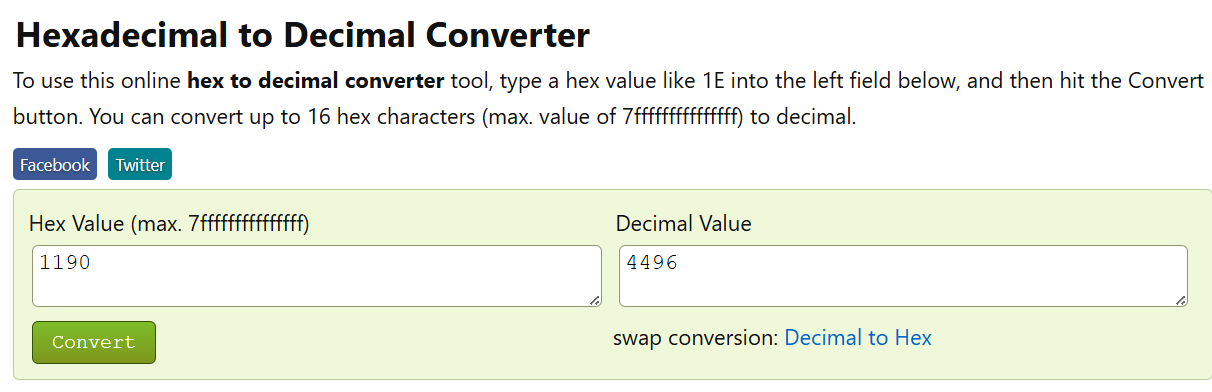
{"@Name":"CallerProcessId","#text":"0x1190"},{"@Name":"CallerProcessName","#text":"C:\\Windows\\System32\\VSSVC.exe"}The ID is logged in hexadecimal. 0x1190 in decimal is 4496:
Answer
4496
Task 4: The snapshot’s volume GUID
Find the assigned Volume ID/GUID value to the Shadow copy snapshot when it was mounted.
When the snapshot was mounted, the NTFS driver logged it as a new volume. I searched Windows_NTFS_output.csv for shadow:
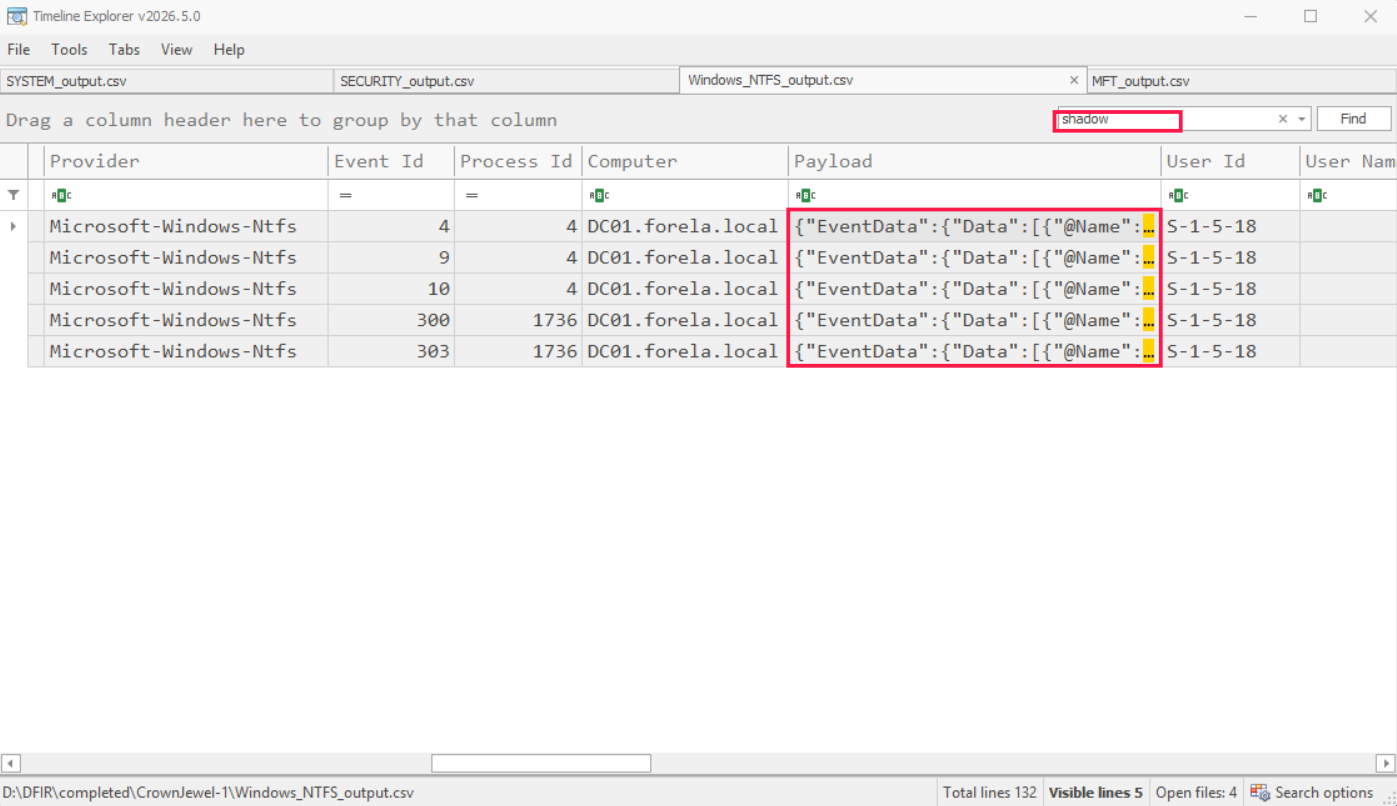
The Payload holds the GUID:
{"@Name":"VolumeCorrelationId","#text":"06c4a997-cca8-11ed-a90f-000c295644f9"}Answer
{06c4a997-cca8-11ed-a90f-000c295644f9}
Task 5: Where the database was dumped
Identify the full path of the dumped NTDS database on disk.
The copy of the database would have a new MFT record of its own. I filtered MFT_output.csv for the file name ntds.dit:
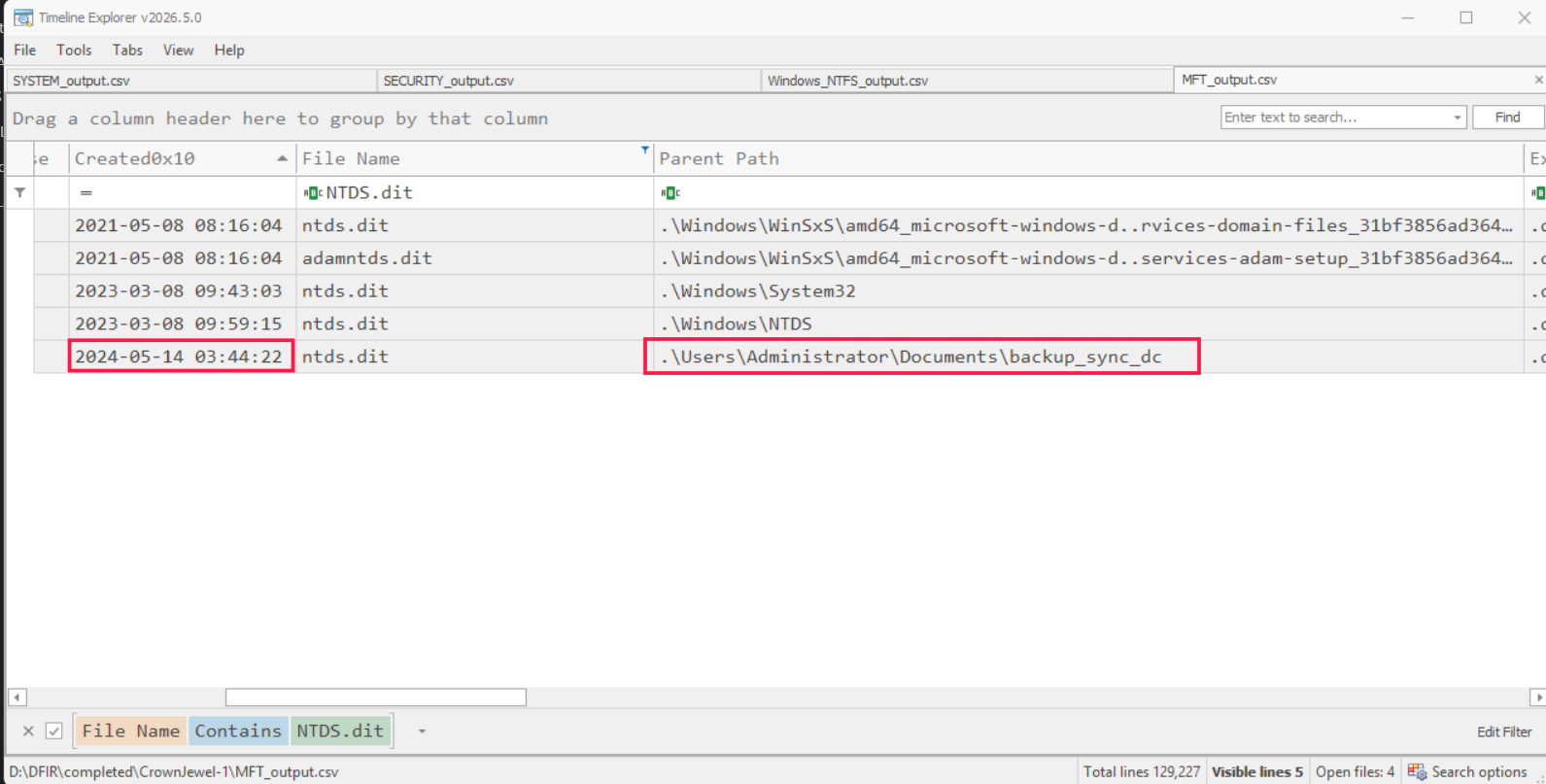
Only one record had a Created0x10 timestamp during the incident, and its Parent Path shows where it was written: a folder in the Administrator’s Documents, named to look like an ordinary backup.
Answer
C:\Users\Administrator\Documents\backup_sync_Dc\Ntds.dit
Task 6: When the dump was created
When was newly dumped ntds.dit created on disk?
The Created0x10 timestamp of the same record:
Answer
2024-05-14 03:44:22
Task 7: The registry hive taken with it
A registry hive was also dumped alongside the NTDS database. Which registry hive was dumped and what is its file size in bytes?
The hashes in NTDS.dit are encrypted with a boot key that lives in the SYSTEM hive, so the attacker would have copied that hive too. To confirm, I filtered for records created on 2024-05-14 and looked at what was created around 03:44:22:
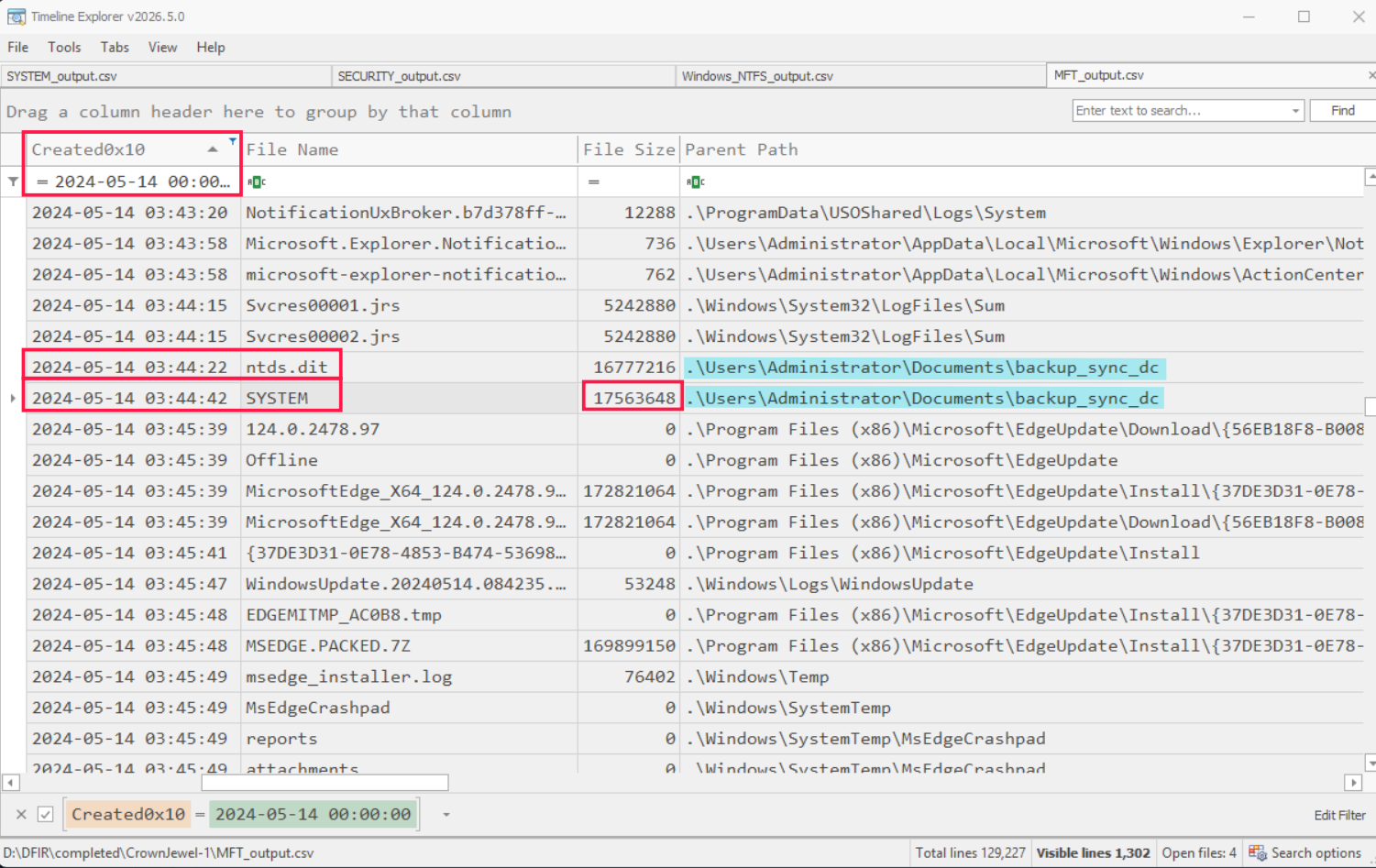
A file named SYSTEM was created at the same time, and its record also gives its size.
Answer
SYSTEM, 17563648
Timeline
| Time (UTC) | Source | Event |
|---|---|---|
| 2024-05-14 03:42:16 | System log | Volume Shadow Copy service starts (Event 7036) |
| 2024-05-14 03:44:22 | MFT | Ntds.dit and the SYSTEM hive written to C:\Users\Administrator\Documents\backup_sync_Dc\ |
Similar
- HTB Sherlocks - CrownJewel-2: the same attacker returns the next day and dumps NTDS with
ntdsutil - HTB Sherlocks - BFT: more MFT analysis, including reading a file straight out of its record